WordCamp organizer resources

WordCamps are community-organized events for web designers and developers that are put together by WordPress users, where you can meet up in person and virtually and learn new skills. The idea is to share with others what you know best while other WordPress enthusiasts offer the same in return. It’s difficult to put together an event like this without experience. You may not know where or how to start. That’s why we’ve compiled these WordCamp organizer resources so you can build your own successful event.
To give us first-hand advice on starting a WordCamp, we connected with Cate DeRosia, a Community Engagement Specialist at Automattic who’s been an organizer and volunteer at WordPress events for the last decade.

Getting approved as a WordCamp organizer
To organize an official WordCamp event, you must first apply as an organizer. The application process is easy, essentially a 20-question online form, but it’s important to start this process before you move on to any other step. All official links to get you started, including the online application, can be found in the Make WordPress Communities section of WordPress.org.
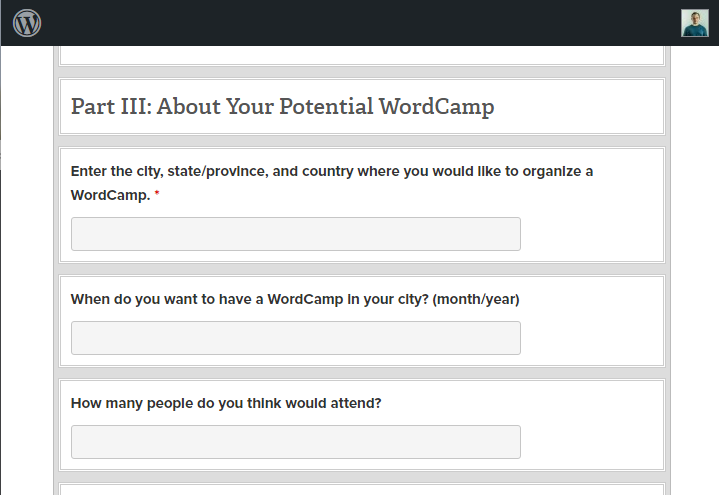
The team at WordPress asks first-time WordCamp organizers to apply and start the pre-planning process about six months before the expected event date. Once approved, you gain access to a mentoring program and resources to guide you every step of the way.
Find a location
If you don’t have a space in mind, start by asking other WordPress professionals in your area if they know of any potential locations. You can also speak to the owners or managers of event spaces in your area to see if they would be interested in hosting your event. Some common locations for WordCamps include:
- Conference centers
- Hotel conference rooms
- Coworking event spaces
- University lecture halls
- Restaurant private event spaces
- Theaters
- Library study rooms
Booking the right space does require some accurate forecasting of how many people might attend. You also need to consider technical requirements, such as if guest WiFi is available, a crucial necessity for any WordCamp. A deposit may also be required to reserve the space, so it’s worth extra time to check around and explore options.
In-person vs. virtual WordCamps
Event space costs are a major consideration, as well. Some places require cleaning fees, security guards, and any number of ad-hoc surcharges. It’s better to go with a modest space you can easily afford rather than raise ticket prices to cover pricey rental costs. While ticket sales and sponsorships help, keeping expenses safely within your budget is critical.
Even if you are leaning toward a virtual event, there are distinct advantages to in-person events, such as hallway conversations, sponsor expos, and lunch meetings with new potential collaborators. Of course, it’s crucial to consider the well-being of attendees, but once you’ve determined you can safely host an event, it will likely be more beneficial for all involved.
DeRosia knows this first hand, speaking specifically of the State of the Word 2021 event in New York.
“State of the Word was a really interesting experience. I mean, it was New York City at Christmas and I love to travel. But beyond that, it really cemented how necessary in-person interactions are.
“I’ve always known and advocated for people to attend as many in-person events as is reasonably possible, within your own time and budgetary limitations, of course. It’s been key to how we’ve grown our initiatives and how we’ve seen other businesses thrive.
“Technologies come a long way to making virtual communication feel more personal, but there’s something about sitting across from the table and really seeing them around other people that teaches you so much about them.”
Set a date
Choosing a date that will work for both your attendees and speakers is important. If possible, you want the event to be on the weekend, so check area sports schedules and community calendars to ensure it’s a relatively open weekend for hosting a local event.
The official recommendation from WordPress is to set aside a 4-6 month planning window to help maintain momentum and creativity from your team. If you’re planning an international event, you need to start this process sooner than later—so have your ducks in a row at least six months in advance. Today, WordCamps often offer a combination of in-person and streaming sessions, and if this is your plan, local scheduling may not be as critical.
Avoid scheduling your WordCamp in conflict with the following events that might prevent people from purchasing a ticket:
- Popular travel weekends, such as Labor Day weekend
- Public school vacation periods
- Religious holidays
- Well-attended area sports events, such as championship tournaments
- Other regional or national WordPress events
Choose your theme
Not to be confused with picking a WordPress website theme, the next step is deciding what you want it to be about. What topic will you focus on? What are the biggest needs of WordPress users in your area, and how can you help build knowledge for your community?
Choosing a theme for your WordCamp event is a big decision. You’ll be choosing a theme that will help direct participants to the kinds of topics they’ll be able to learn about and share at the event.
A festive theme will also help guide your visual assets, including your event website design, t-shirt design, marketing assets, and possibly other event elements. Like a birthday party or fundraiser, a good theme will make your event more visually interesting and memorable. If your theme is uninteresting or does not fill a need, you may struggle to sell tickets.
Getting the message across
If you wanted to host a WordCamp focused on WordPress plugins, for example, you could expect attendees to learn more about different ways they can use WordPress plugins in their website development process. But it’s vital to convey precisely what knowledge attendees will gain about plugins in your marketing materials.
It’s a good idea to reach out to local WordPress power users and find out the following:
- What issues do they face today in developing WordPress sites today?
- What questions do they hear most often from beginning WordPress users?
- Who are the “expert” WordPress users in the area, and what have they been blogging about lately?
This list of questions is endless, but proper research gives you better chances for WordPress success.

Pitch your idea to the local community
Now it’s time to get the idea out there. You’ll need some co-organizers to help plan and communicate your event’s news. Look for people who have experience in event planning or relevant industry knowledge. Carefully consider your goals and how they align with what attendees would want from your event before you pick a date and location.
“A community is about them, not you,” DeRosia explained. “Listen to what they’re saying and verify before you act. Don’t do one without the other.”
Understanding local needs
When given the chance, your local WordPress community will be open about what they’re struggling with. “You simply have to be willing to hear it with as few preconceptions as possible. Once you verify some level of understanding, you can start to work on solutions,” DeRosia elaborated.
“Create a product that fixes it. Write a blog post that answers the question. Find a source to collaborate with. If people are feeling heard and their needs are being met, your community will thrive, and eventually, without you. Which is a beautiful thing.”
Create your WordCamp website
The next step is to create a website for your WordCamp. You’ll want to include information such as date, time, location, and other relevant details. You’ll also want to include any other relevant information such as accessible accommodations, food options, and other amenities. This will help people know what to expect when they attend your event and ensure they have the necessary arrangements before attending.
WordCamp Central is the undisputed hub for global WordPress events. You’ll find links to the official WordCamp planning site and the official organizer application. There’s also a calendar of upcoming WordCamps. If you’ve never been to one before, checking one out in person is highly recommended before hosting your own.
Get volunteers to help at WordCamp
This may seem like the most daunting step, but it is also the most crucial. You will need experienced volunteers to help with all the work.
The best way to get volunteers is by reaching out to people you know who are interested in web design and development. Offer them a chance to be involved in something they care about. You can also find volunteers on social media sites like Twitter or Facebook and local Reddit forums specializing in web design and development. Some organizers have even successfully tapped community or church groups to help with day-of-event needs, like serving at the registration table and handing out surveys.
Getting a commitment
It’s important to ensure these people are committed before you organize your event because they’ll need to spend time helping with planning and preparing for your WordCamp, even if they can’t attend in person. You want to create a team of volunteers who will stay committed and work the hours.
And don’t forget to look close to home. There’s room for everyone in the WordPress community, and DeRosia is fortunate enough to have a life partner in the same industry.
“By having different roles in the same ecosystem, we can reasonably travel together and have shared experiences, while still holding jobs that best suit our skills,” DeRosia shared. “It’s also allowed us to have our daughters involved as early as when they were 10 & 12. Now, 10 years later, they’re finding their own place and roles inside the community.”

Find sponsors and apply for grants
Most WordCamp organizers rely on sponsors to help pay for the event. You don’t want to be stuck with a huge personal bill. WordPress has secured global sponsors to help with WordCamp costs, but many regional and local companies are open to helping invest in the community. Through a Call for Sponsors section on your WordCamp site, you can offer benefits such as logo recognition and expo opportunities to sponsors, depending on your resources.
You may also want to apply for grants from organizations to help fund your event. Usually, these grants require some commitment from the applicant, such as following a template or meeting certain deadlines throughout the process. But if they can help you offset costs and make your event more affordable, then it might be worth it!
Some tips on finding sponsors:
- Approach local WordPress-related businesses, big and small. Businesses (and individuals) that design websites, offer training, write content, or provide security are all potential sponsors, as WordCamp sponsorships can bring them new clients.
- Seek out companies in your community that are in the larger tech sphere (hosting, computer repair, other tech products) as they may appreciate a chance for promotion.
- It can’t hurt to ask the “big name” companies in your town, especially if they have a habit of sponsoring community events. Car dealerships, product manufacturing, local restaurant chains, etc. may have promotional budgets they can spend.
- If anyone in your local WordPress community has connections to ISPs, hosting providers, or other tech companies—even if not local—that can be another sponsorship opportunity.
- Some restaurants or printing shops may be willing to give you a discount on food, t-shirts, etc. in exchange for a sponsorship.
Sell tickets
As the event draws closer, it’s time to sell some tickets. This will help cover the cost of the venue, food, and other expenses. Some WordCamp organizers offer different levels of tickets, from general admission to microsponsor to streaming-only options.
While you may be tempted to offer free tickets for your first WordCamp, free events can sometimes be perceived as less valuable. You must make the right decision for yourself and your community. However, a low-priced ticket event is often better attended than a free one. Plus, selling tickets gives you a better idea of how many people to expect at your WordCamp.
According to the people at WordPress, average prices run $20-$25 per day. If you believe you’ll have local interest from individuals who cannot afford a ticket, offer Scholarship Ticket options, where they can apply to have their cost covered by a sponsor. To build a community, it’s vital to make your event accessible to everyone who wants to attend, and for many, cost is a concern.
Promote your WordCamp event
Before your big day arrives, you’ll want to promote your WordCamp to as many people as possible. Promoting your WordCamp will help boost ticket sales and get people excited about the event.
Start with simple actions such as sharing your website on social media and reaching out to local influencers in your niche who might be interested in talking about your event. LinkedIn and Twitter make it easy to find WordPress enthusiasts with a quick search.
Reach out to your volunteers and sponsors to ask for additional channels that may be available for promotion. Local businesses may be willing to share their PR resources to help support your cause. Send press releases to your local media, including newspapers, city blogs, and TV and radio stations.
Once you go through the process of organizing your first WordCamp event, you’ll likely find yourself with a list of new ideas and connections to incorporate the following year. DeRosia maintained, “I legitimately find inspiration in nearly everyone I meet, particularly people who are out there giving of themselves speaking, volunteering, and sharing their stories.”
Get organizing
Now that you have seen our roundup of WordPress organizer resources, are you ready to go out and start your own WordCamp? If you are, then— what are you waiting for? It’s time to get out there and make an impact in the WordPress world. From finding a location to gathering a team of volunteers, it takes passion and dedication to organize a successful WordCamp event. It’s impossible to know everything before you get started, but hopefully, this article will get you off on the right track. Be sure to let us know on social media if you discover any additional tips you want to share.



More articles from us!
11 interactive 404 pages to keep your audience engaged

How much does a website cost?